Cloud Computing Is Just npm install for Infrastructure

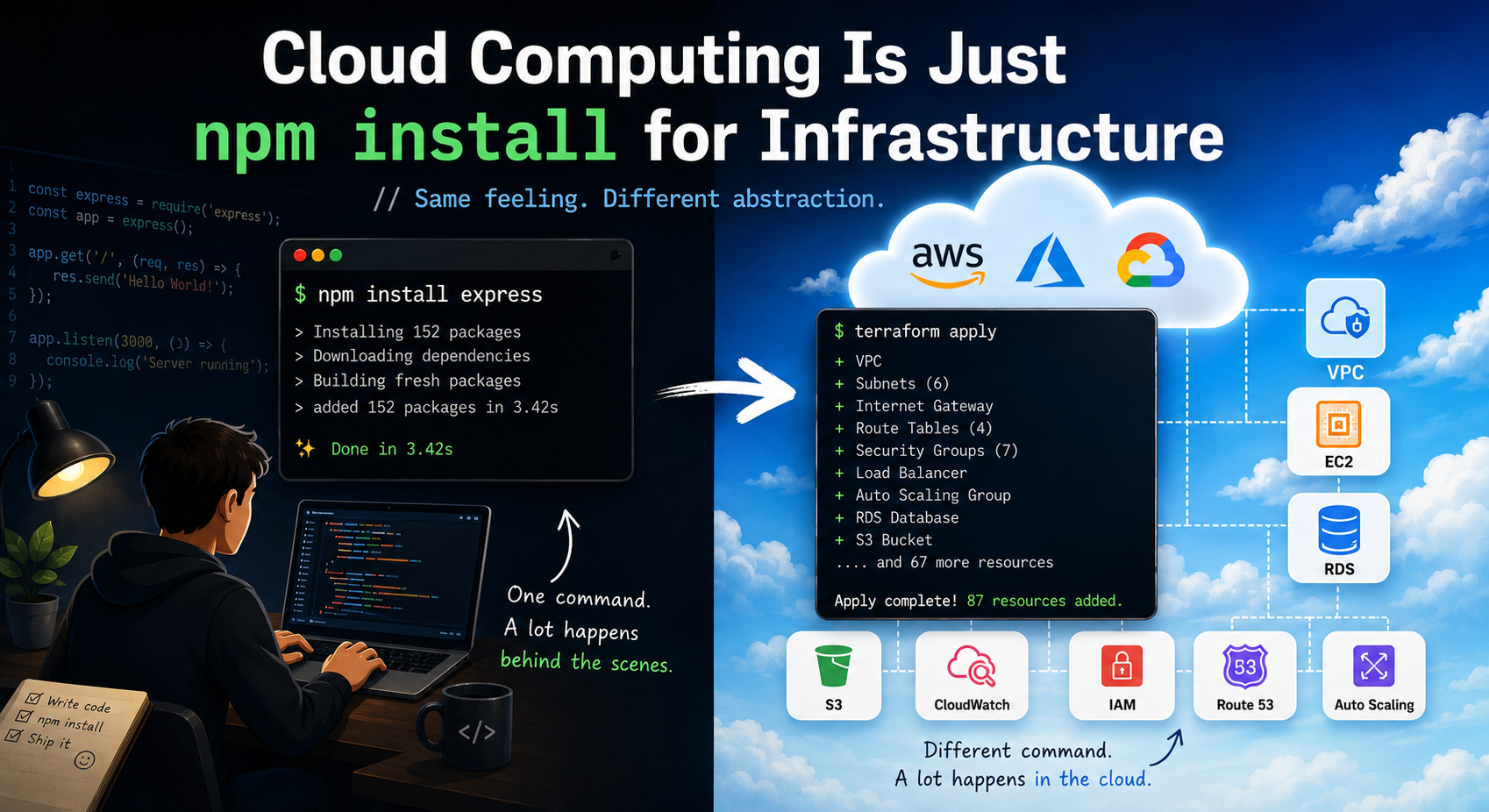
Every time you pull in a third-party package instead of writing something yourself, you make a trade: you stop owning the internals, but you're still on the hook for how you use it, what it costs you at scale, and what happens the day it breaks in production.
Cloud computing runs on the exact same trade: you're just importing servers, storage, and networking instead of a library.
That mental model answers the questions that actually matter once you move past the marketing pitch: If I don't manage the OS anymore, what am I still on the hook for? Do I self-host, use a managed service, or mix both? Why does my bill move even when my code didn't change? And what happens when the dependency I'm relying on goes down, gets slow, or degrades under load?
In this article, I'll walk through the 5 concepts that answer those questions.
1. The Shared Responsibility Model
While cloud providers manage a significant portion of the infrastructure, customers still have important security and operational responsibilities.
This concept is known as the Shared Responsibility Model, and the division of duties changes depending on whether you're running workloads On-Premises, or using IaaS, PaaS, or SaaS.
On-Premises: You Manage Everything
When applications run in your own data center, every component—data, devices, accounts, IAM, applications, network controls, operating systems, physical servers, networking, and the datacenter itself is your responsibility.
Since there's no cloud provider involved, there's nothing to share.
Infrastructure as a Service (IaaS)
Examples include virtual machines such as Amazon EC2, Azure Virtual Machines, and Google Compute Engine.
The provider supplies the physical infrastructure, hosts, networking, and datacenters, while you manage data, devices, accounts, IAM, applications, network controls, and operating systems.
IaaS offers the most flexibility of the cloud models but also requires the most operational management.
Platform as a Service (PaaS)
Examples include Azure App Service, AWS Elastic Beanstalk, Google App Engine, and Heroku.
PaaS removes the burden of managing operating systems and infrastructure. Customers still manage data, devices, and accounts; IAM, applications, and network controls are shared; and the provider manages the OS, infrastructure, hosts, networking, and datacenters.
Software as a Service (SaaS)
Examples include Microsoft 365, Salesforce, Google Workspace, and Dropbox.
Customers manage data, devices, and accounts, with IAM as a shared responsibility.
The provider manages everything else—applications, network controls, OS, infrastructure, hosts, networking, and datacenters making SaaS the model with the lowest operational overhead.
Shared Responsibility at a Glance
| Service Model | Customer Manages | Shared | Provider Manages |
|---|---|---|---|
| On-Premises | Everything | None | Nothing |
| IaaS | OS, applications, IAM, network controls, data | None | Infrastructure & physical hardware |
| PaaS | Data, devices, accounts | IAM, applications, network controls | OS, infrastructure & physical hardware |
| SaaS | Data, devices, accounts | IAM | Applications, OS, infrastructure & physical hardware |
No matter which model you choose, your data, devices, and user accounts remain your responsibility.
As you move from On-Premises → IaaS → PaaS → SaaS, the provider takes on progressively more of the operational burden but protecting users, managing access, and securing data always stay in your hands.

2. Cloud Deployment Models: Public, Private, and Hybrid
A cloud deployment model defines where your infrastructure is hosted, who owns it, and who can access it.
The three primary models are:
- Public
- Private
- Hybrid
each offer different levels of flexibility, security, and control.
Public Cloud
Owned and operated by a provider such as Microsoft Azure, AWS, or Google Cloud Platform, with infrastructure shared among multiple customers.
- Characteristics: no hardware to maintain, rapid provisioning, pay-as-you-go pricing, high scalability, global availability.
- Advantages: lower upfront costs, rapid deployment, automatic maintenance, high availability ideal for startups and growing businesses.
- Limitations: less control, shared environment, potential compliance restrictions.
- Best for: web applications, mobile backends, dev/test environments, AI/ML workloads, disaster recovery.
Private Cloud
Dedicated to a single organization, hosted either in-house or by a third-party provider, with no resource sharing across organizations.
- Characteristics: dedicated infrastructure, greater administrative control, enhanced security, custom networking.
- Advantages: better compliance support, increased data privacy, full infrastructure control, custom security policies.
- Limitations: higher costs, requires skilled administrators, slower scaling.
- Best for: government, healthcare, banking and finance, and other heavily regulated enterprises.
Hybrid Cloud
Combines public and private environments, letting workloads and data move between them as needed This keeps sensitive workloads private while using the public cloud for scale.
- Characteristics: combines both models, flexible workload placement, supports gradual migration, optimizes cost and performance.
- Advantages: flexibility, business continuity, disaster recovery, cost optimization, easier migration from on-premises.
- Limitations: more complex architecture, requires strong networking and identity management, more governance overhead.
- Best for: large enterprises, seasonal traffic spikes, backup/DR, organizations migrating to the cloud.
Quick Comparison
| Feature | Public Cloud | Private Cloud | Hybrid Cloud |
|---|---|---|---|
| Ownership | Cloud provider | Single organization | Both |
| Cost | Low upfront | Higher | Moderate |
| Scalability | Excellent | Limited by hardware | Excellent |
| Security | Good | Very High | High |
| Maintenance | Provider | Organization | Shared |
| Flexibility | High | Moderate | Very High |
Example: An e-commerce company might run its customer-facing website on the public cloud to handle traffic spikes during sales events, store payment records in a private cloud for compliance, and connect both through a hybrid architecture for secure data exchange balancing security, performance, and cost.

3. The Consumption-Based Pricing Model
Instead of purchasing expensive servers and networking equipment upfront, the cloud lets businesses pay only for what they use, an approach known as the consumption-based model, or pay-as-you-go pricing. Think of it like an electricity bill: you pay for the units you consume, not a fixed monthly amount.
Traditional Infrastructure vs. Cloud Consumption
| Traditional Infrastructure | Consumption-Based Cloud |
|---|---|
| Large upfront hardware investment | No upfront infrastructure purchase |
| Pay even when servers are idle | Pay only for resources you use |
| Capacity planning required | Scale resources up or down instantly |
| Hardware maintenance is your responsibility | Cloud provider manages infrastructure |

Key Benefits
- No upfront costs : start using services immediately without buying hardware or licenses.
- Pay only for what you use : compute hours, storage, database transactions, data transfer, and function executions are all billed based on actual consumption.
- Scale when needed : resources grow during demand spikes and shrink afterward, an elasticity that's expensive to replicate on-premises.
- Better cost optimization : usage-based billing encourages practices like shutting down unused VMs, right-sizing instances, using autoscaling, and monitoring spend regularly.

Consumption-Based vs. Subscription-Based Pricing
| Consumption-Based | Subscription-Based |
|---|---|
| Pay for actual usage | Fixed monthly or yearly fee |
| Flexible costs | Predictable costs |
| Ideal for changing workloads | Best for consistent workloads |
| Easy to scale | Usually includes predefined resource limits |
An e-commerce site running a consumption-based model keeps only a few virtual machines running on normal days, automatically adds instances during festival sales, and scales back down once traffic normalizes, paying only for the extra capacity while it's actually in use.
To avoid cost surprises, it's worth setting spending budgets, enabling billing alerts, monitoring usage, and reviewing bills regularly.

4. High Availability vs. Scalability
Two qualities determine whether users get a smooth experience in the cloud: high availability and scalability. They're often mentioned together, but they solve different problems.
High Availability
High availability (HA) is a system's ability to remain operational even when failures occur. Rather than preventing every failure, cloud platforms detect problems and automatically shift workloads to healthy resources. Providers achieve this through redundant infrastructure, multiple data centers and Availability Zones, automatic failover, and SLAs that define expected uptime.
Example: if a server crashes during an online banking transaction, traffic is redirected to a healthy instance so customers don't lose access to their accounts.
Scalability
Scalability is the ability to handle increasing or decreasing workloads by adjusting resources—a matter of capacity rather than uptime.
- Vertical scaling (scale up): add more CPU, RAM, or faster storage to an existing machine—simple, but limited by hardware ceilings.
- Horizontal scaling (scale out): add more instances and distribute traffic across them preferred for cloud-native applications, and often automated based on CPU, memory, or request volume.
High Availability vs. Scalability
| High Availability | Scalability |
|---|---|
| Keeps services running during failures | Handles increasing workloads efficiently |
| Focuses on minimizing downtime | Focuses on increasing capacity |
| Uses redundancy and failover | Uses additional computing resources |
| Improves reliability | Improves performance under load |
A movie ticket booking platform sees a traffic surge when tickets for a blockbuster release, the application automatically adds servers to handle demand (scalability), and if one server fails mid-rush, requests are redirected to healthy servers without interrupting users (high availability).
A well-designed cloud application aims for both.
5. Reliability and Predictability: Building Trust Beyond Uptime
Hosting an application in the cloud doesn't, by itself, guarantee a great experience. Users expect applications to stay available, recover quickly from failures, and perform consistently regardless of workload—expectations built on two more fundamental principles: reliability and predictability.
Understanding Reliability
Reliability is a system's ability to continue operating, or recover quickly, when failures occur. Hardware failures, software bugs, network outages, and even data center outages are inevitable in distributed systems, so rather than trying to eliminate every failure, cloud platforms are designed to detect, isolate, and recover from them automatically, distributing applications across multiple VMs, Availability Zones, or regions so that if one component goes down, another takes over with minimal disruption.
For example, if a virtual machine crashes unexpectedly, the platform can automatically provision a replacement and restore service without manual intervention.
Understanding Predictability
Predictability is about delivering consistent application behavior, performance, and costs over time, giving teams confidence that infrastructure will respond as expected under both normal and peak workloads. Providers support this through tools that monitor infrastructure health, analyze workload patterns, estimate future resource needs, and automatically adjust capacity. The result:
- Stable application response times
- Consistent system behavior
- Predictable infrastructure costs
- Better resource planning
- Improved operational efficiency
Reliability vs. Predictability
| Reliability | Predictability |
|---|---|
| Focuses on recovering from failures | Focuses on maintaining consistent performance and behavior |
| Ensures applications remain available | Ensures applications perform consistently over time |
| Achieved through redundancy, failover, and fault tolerance | Achieved through monitoring, autoscaling, analytics, and capacity planning |
| Measured by availability, resilience, and recovery | Measured by performance consistency, scalability, and cost stability |
Reliability answers: "Will the application continue running if something fails?" Predictability answers: "Will the application continue performing as expected as demand changes?"
How Cloud Providers Deliver Both
For reliability:
- Redundant infrastructure that eliminates single points of failure
- Availability Zones that isolate outages
- Load balancing that distributes traffic
- Automatic failover to healthy instances
- Backup and disaster recovery plans
- Continuous health monitoring that restarts or replaces unhealthy resources
For predictability:
- Performance monitoring of CPU, memory, storage, latency, and response times
- Autoscaling that adds or removes capacity based on demand
- Capacity planning based on historical usage data
- Cost management tools for budgeting and forecasting
- Performance analytics dashboards for continuous optimization
Real-World Example
Imagine an online shopping platform during a major holiday sale. A reliable platform detects a failed server, automatically replaces it, and keeps serving customers with minimal interruption. A predictable platform simultaneously provisions additional instances as traffic grows, maintains fast response times, balances load across resources, and gives accurate cost estimates. From the customer's perspective, the site simply stays fast and available no matter what's happening underneath.
Why It Matters
Organizations that prioritize reliability and predictability see reduced downtime, improved customer trust, consistent performance, faster recovery, better capacity planning, lower operational risk, and more accurate cost forecasting freeing engineering teams to focus on new features rather than firefighting.
Best Practices for Developers
Bringing all of these principles together, a few practices consistently show up in well-architected cloud systems:
- Design applications to tolerate failure rather than assuming infrastructure is always available.
- Deploy workloads across multiple Availability Zones whenever possible.
- Use load balancers to distribute traffic efficiently.
- Enable autoscaling to handle varying workloads automatically.
- Continuously monitor application health, latency, and resource utilization.
- Implement automated backups and regularly test disaster recovery procedures.
- Use infrastructure as code for consistent, repeatable deployments.
- Understand your shared-responsibility boundary for the service model you're using (IaaS, PaaS, or SaaS).
- Choose the deployment model (public, private, or hybrid) that matches your compliance and scalability needs.
- Monitor cloud spending and optimize unused resources to keep consumption-based costs predictable.
Conclusion
Cloud computing isn't just about running applications online—it's a set of interlocking principles that together determine whether an application is secure, well-placed, affordably billed, and dependable under load.
The Shared Responsibility Model clarifies who secures what. Deployment models determine where workloads live and who controls them. The consumption-based model ties cost directly to actual usage. High availability and scalability ensure applications stay up and perform well as demand changes. And reliability and predictability tie it all together, ensuring systems recover from failure and behave consistently over time.